
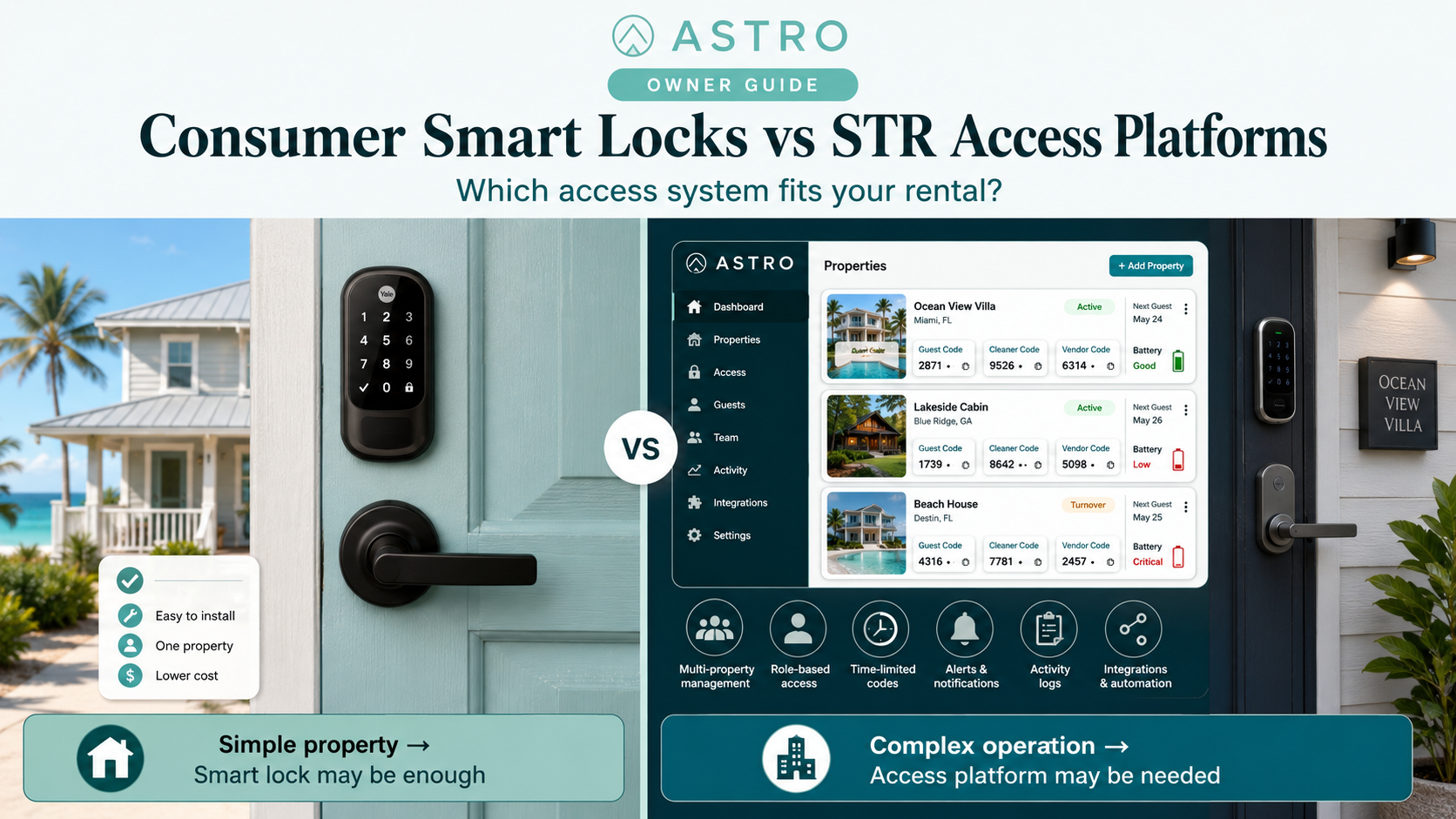
Consumer Smart Locks vs STR Access Platforms: Which Access System Should Owners Choose?
ASTRO does not sell, install, or endorse smart locks or access vendors. This article is educational only—not security, legal, locksmith, or building-code advice. Product and brand names are examples for owner research, not recommendations.
What owners need to understand before they pick a brand
A smart lock can be a good purchase. A smart-lock system can be a good operation. Those are not the same thing.
Many short-term rental owners start by comparing lock brands: Schlage, Yale, August, Kwikset, and other familiar names. That makes sense—the hardware is visible, tactile, and either feels solid or cheap. But the lock is only one layer. For the full stack, start with Smart Locks for Short-Term Rentals: What Owners Actually Need.
The bigger question is whether the access system can handle your operating model: guest codes, cleaner codes, vendor access, reservation changes, direct bookings, platform bookings, owner blocks, maintenance visits, battery alerts, lockout recovery, and shared-entry access.
A product may be a good smart lock but not a complete STR access solution. Another may not manufacture the lock at all but may be the software layer that makes rental operations work.
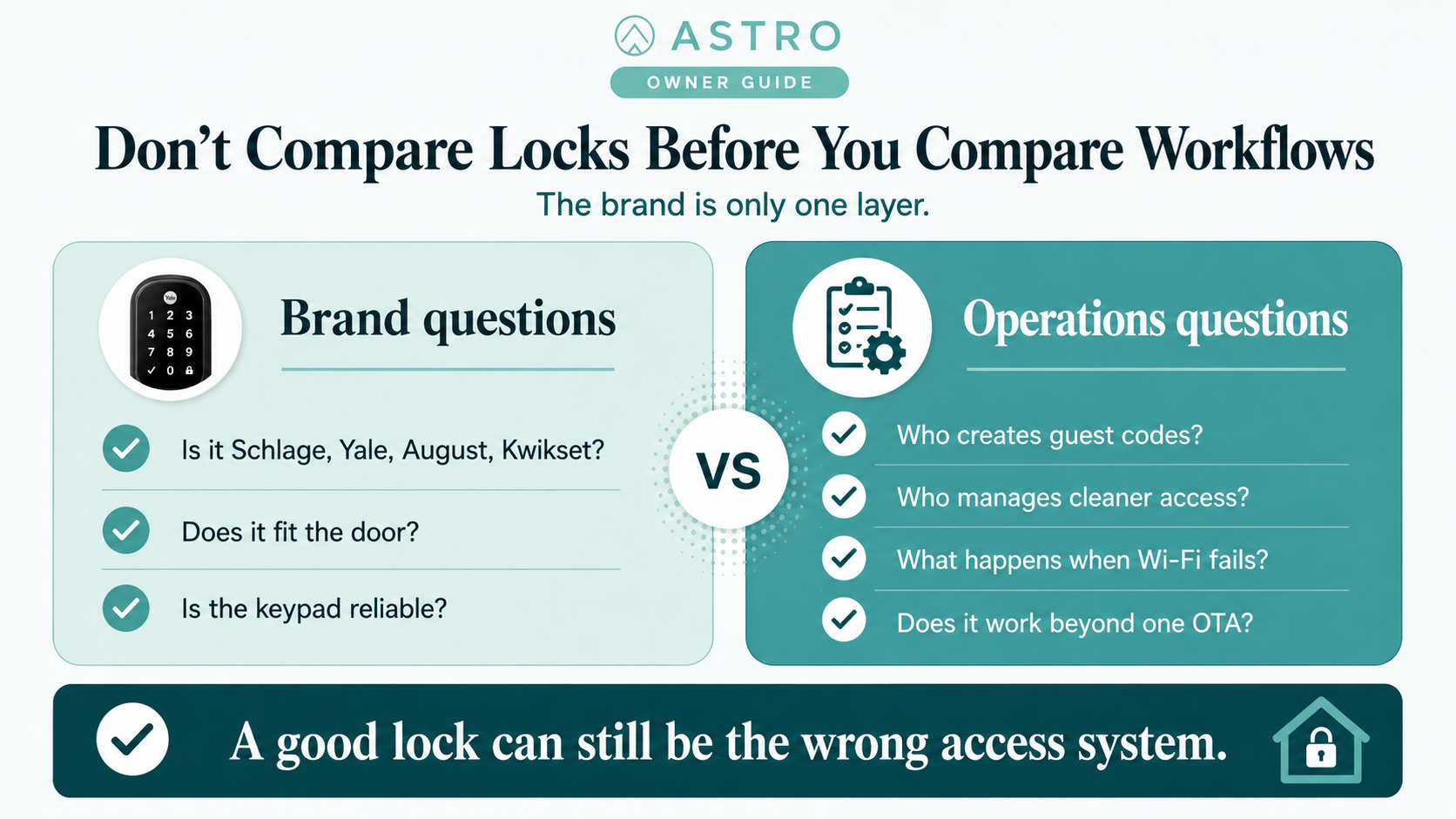
The basic decision
There are four practical access-system categories for short-term rental owners:
- Consumer smart locks
- STR access platforms
- PMS-integrated access workflows
- Shared-building or commercial access systems
Each can be right. Each can be wrong. The right choice depends on property type, booking channels, team size, failure tolerance, and how much access work you want to manage manually.
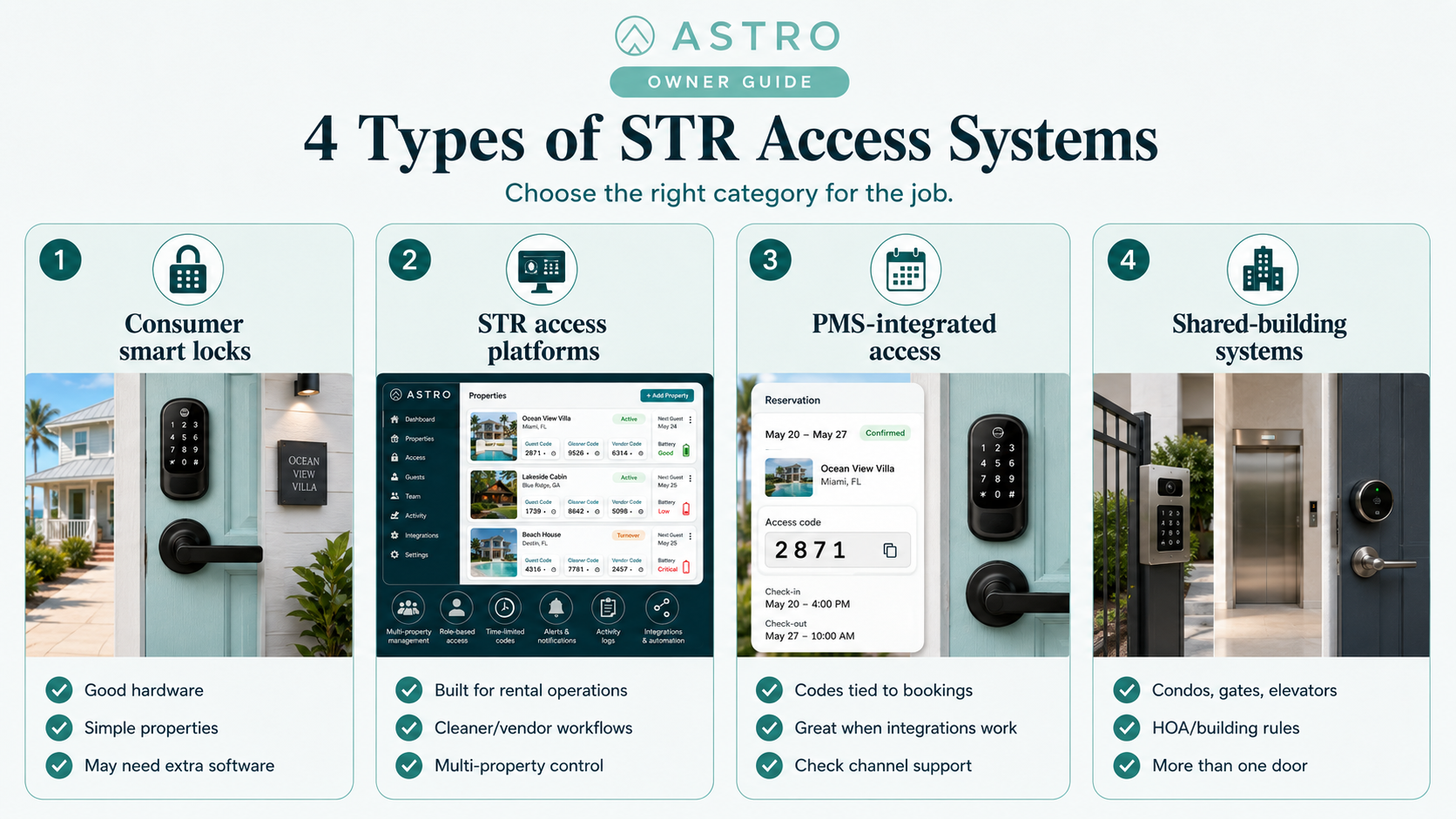
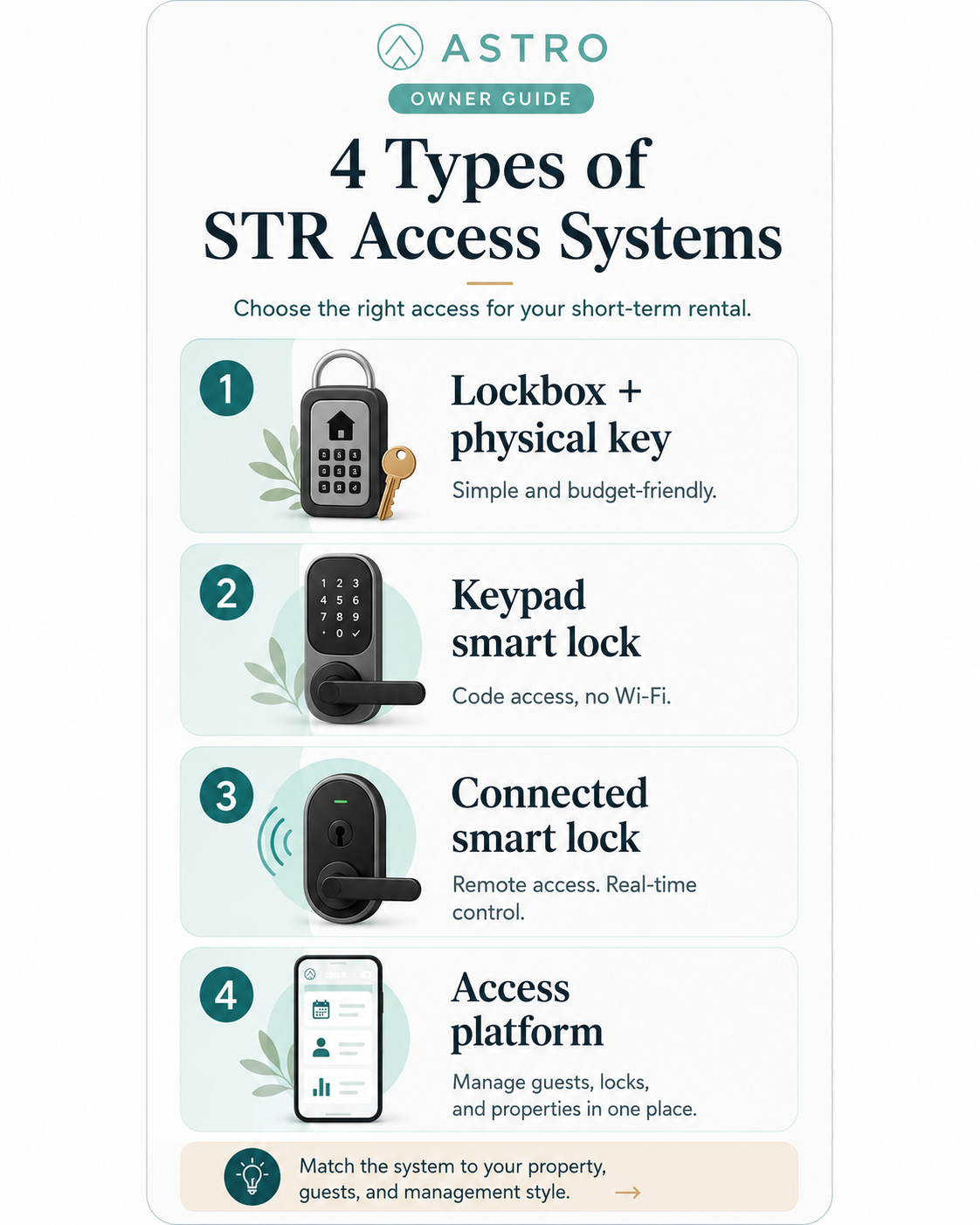
Category 1: Consumer smart locks
Consumer smart locks are the familiar hardware brands most owners encounter first—Schlage, Yale, August, Kwikset, Eufy, Level, Lockly, Wyze, Aqara, TTLock-compatible hardware, and similar products sold through mainstream retailers.
That does not make them bad. Many are sturdy and perfectly adequate for a single-property owner. The issue is the starting problem: consumer locks usually answer “How do I manage my own door more conveniently?” STR owners need “How do I safely manage temporary access for guests, cleaners, vendors, co-hosts, and emergency contacts without babysitting every stay?”
When a consumer smart lock is enough
A consumer smart lock may be enough if you have one property, mostly one booking channel, simple cleaner workflow, few vendors, an easy door fit, reliable Wi-Fi, a strong backup-key plan, and a nearby owner or co-host. For a cabin, cottage, or single-family STR, high-quality consumer hardware may be the right starting point—if you are honest about what it automates.
Where consumer locks can fall short
Consumer locks can fall short when you need automatic codes from reservations, multi-channel code delivery, cleaner schedule management, one-time vendor codes, multi-property control, robust audit logs, centralized battery monitoring, PMS integration, Vrbo or direct-booking automation, shared-building access, team permissions, or operational support. Sometimes the lock is fine; the owner expected the lock app to behave like rental operations software. That is the mismatch.
Category 2: STR access platforms
STR access platforms are built around rental operations rather than ordinary homeowner convenience. They may connect multiple lock brands, PMS tools, booking channels, and workflows. Their value is the management layer—not only the lock.
Consider this category when you have multiple properties, multiple booking channels, remote ownership, a cleaner or vendor team, a co-host or manager, frequent turnovers, direct bookings, recurring maintenance access, or low tolerance for lockout problems.
What an STR access platform should do
A good STR access platform should help with guest code automation, reservation-based code windows, cleaner and vendor access, multi-property management, team permissions, code expiration, audit trails, battery alerts, remote troubleshooting, PMS or channel integration, and manual override workflows. The question is whether it supports your operating model—not merely whether it connects to a lock.
The platform tradeoff
The advantage is operational control. The downside is added complexity and cost: lock compatibility, subscriptions, PMS setup, staff permissions, integration reliability, learning curve, and support handoffs between lock vendor, platform, PMS, and OTA. For a remote or multi-property portfolio, that tradeoff often pays off. For one simple property, it may be more system than you need.
Category 3: PMS-integrated access
Many owners already use a PMS, channel manager, or hosting operations tool with smart-lock integrations. In theory the workflow is excellent: reservation created → access code generated → code sent to guest → code activates at check-in → code expires at checkout → cleaner access remains separate.
Before relying on it, ask which lock brands and models are supported, which booking channels trigger codes, whether changes and early/late stays sync, whether cleaner codes are generated, where codes are displayed, what happens when sync fails, who provides support, whether audit logs exist, and whether old codes are removed automatically. Not every “smart lock integration” means full booking-aware automation.
Category 4: Shared-building and commercial access systems
Condos, resort buildings, boutique inns, and multi-unit properties may involve building entrance, gates, parking, elevators, unit doors, pools, package rooms, and staff areas. A consumer deadbolt on the unit door may solve only one piece.
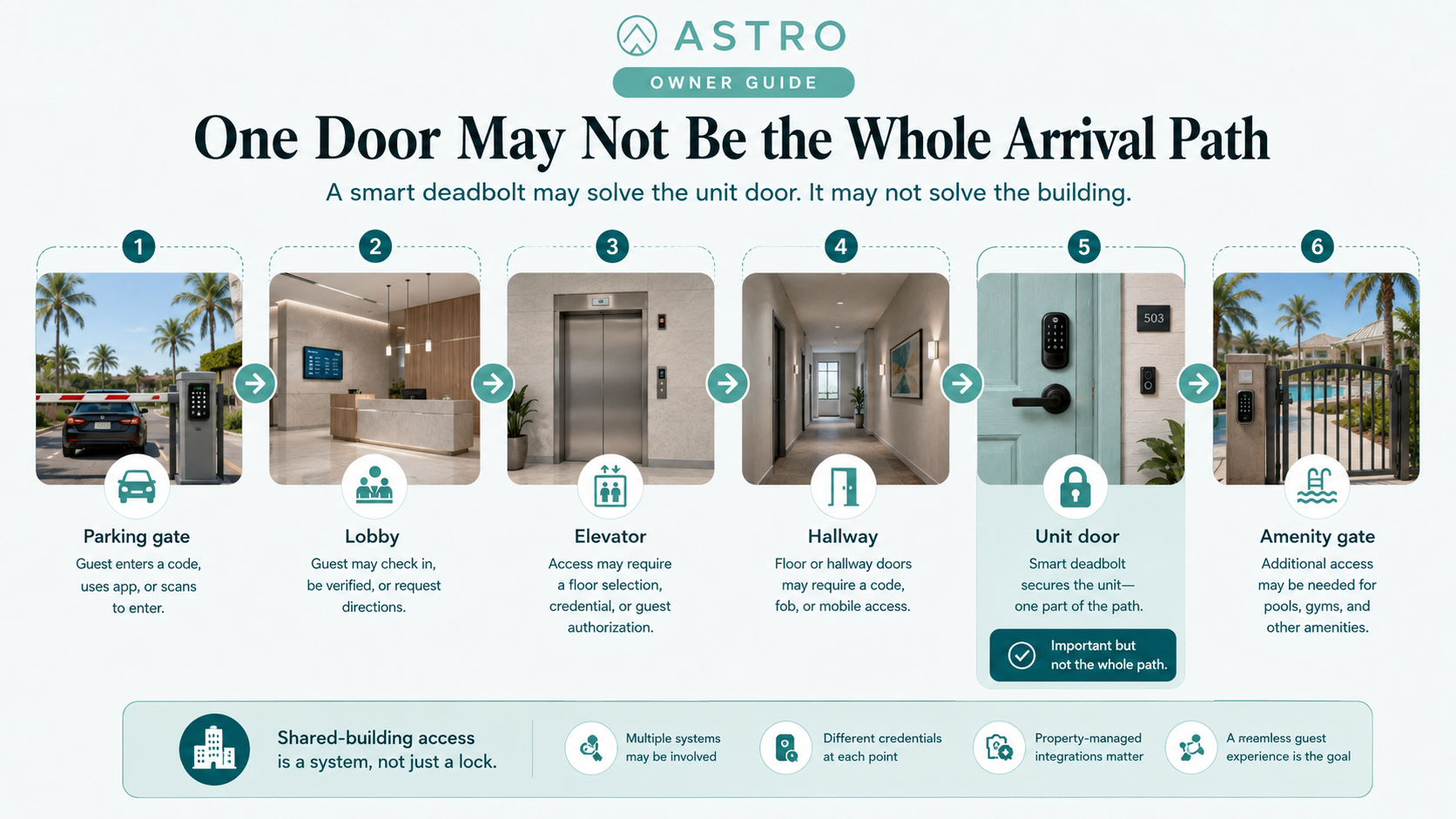
The trap is thinking “I installed a smart lock on the unit, so guest access is solved.” A guest who cannot reach the lobby, gate, elevator, or parking still has an access problem. HOAs, building security, guest registration, fire code, fobs, and local self-check-in rules all matter. Solve the whole arrival path, not just the unit door.
How to choose the right category
One property, simple access, nearby owner? A consumer smart lock may be enough. Remote owner or frequent turnovers? Consider stronger automation. Multiple properties or booking channels? An STR access platform or PMS-integrated access likely matters. Condo, resort, shared building, gate, elevator, or amenities? Treat it as a shared-access system, not just a lock purchase.
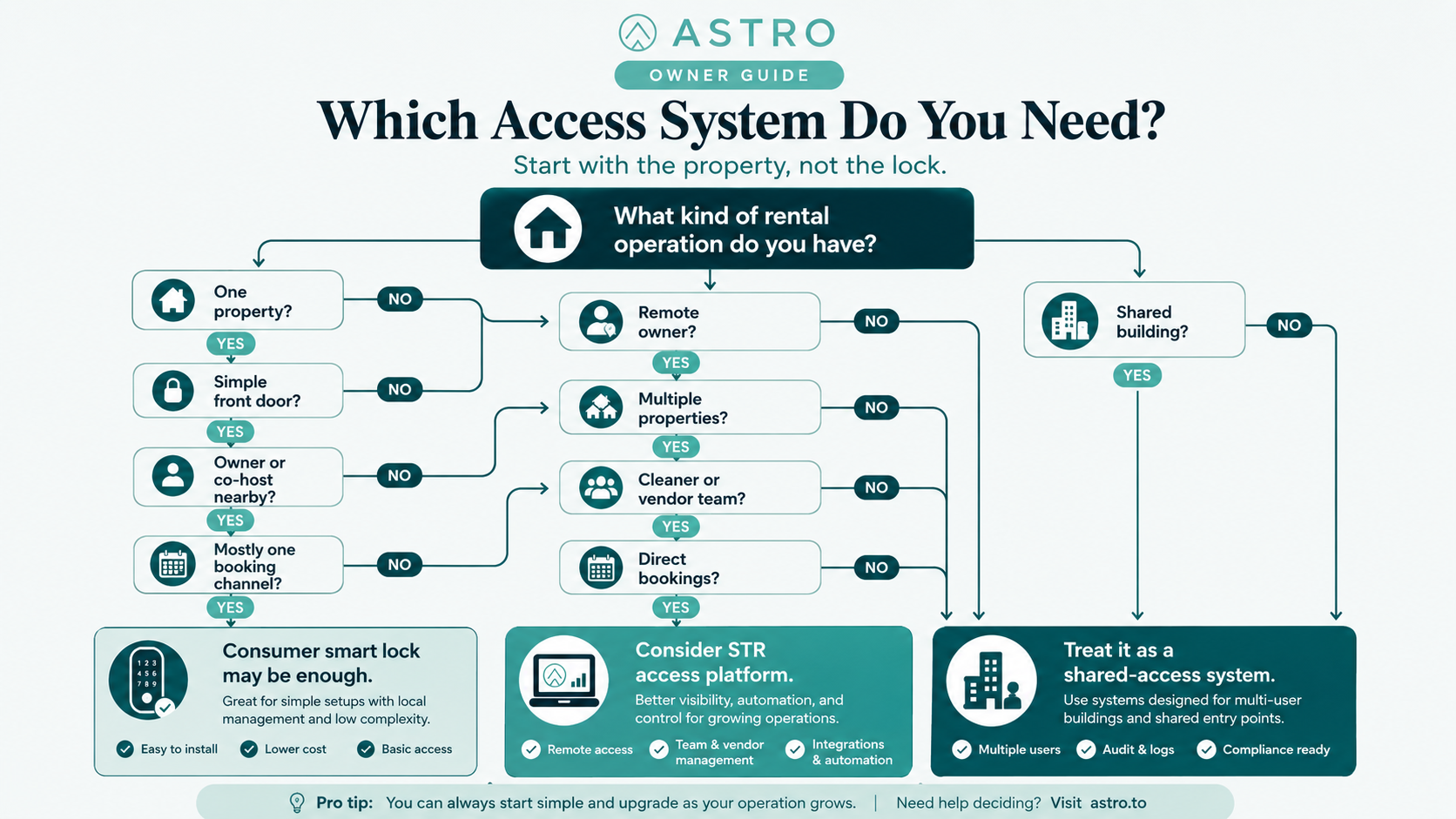
Compare by job, not brand
Compare access systems by the jobs they must perform:
- Guest entry — Can guests reliably enter during their stay window without owner intervention?
- Cleaner access — Can cleaners enter on schedule without using guest codes?
- Vendor access — Can maintenance and inspectors receive limited access?
- Remote control — Can you manage access when not at the property?
- Failure handling — What happens when lock, battery, Wi-Fi, app, or integration fails?
- Channel independence — Does the system work beyond one OTA?
- Scaling — Can it support more properties, doors, users, and booking sources?
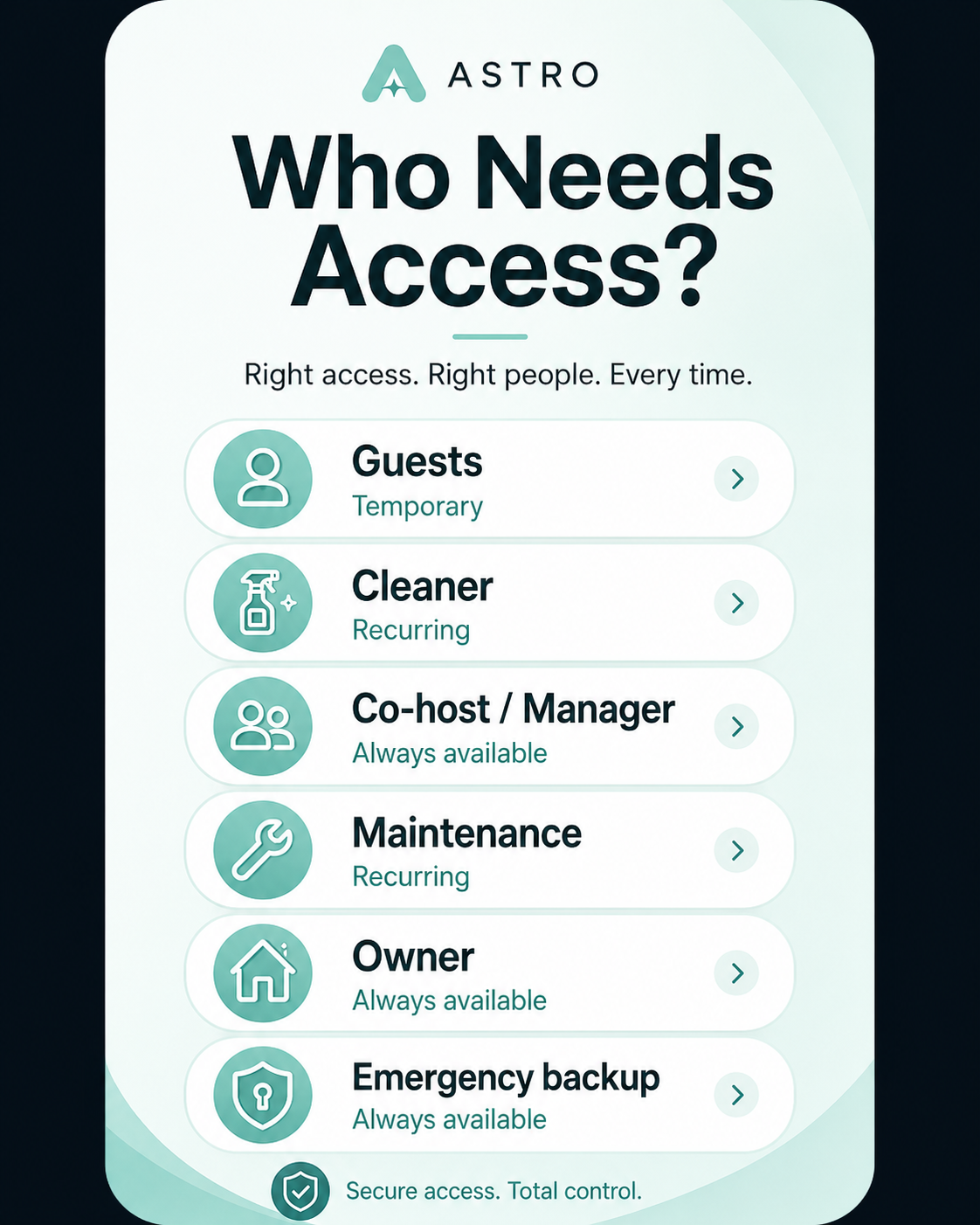
A cheaper lock may win guest entry and fail the other jobs. That is fine only if you truly need guest entry alone.
Consumer lock vs STR access platform
Consumer smart lock fits single property, simple door, simple booking flow, nearby owner, limited cleaner complexity, and low software cost. Risk: more manual code work, weaker operations layer, integration gaps, support that may not understand STR use.
STR access platform fits multiple properties, remote management, cleaner and vendor teams, multiple booking sources, direct bookings, and need for audit logs and centralized control. Risk: subscription cost, setup complexity, compatibility limits, integration dependence, multiple vendors when something breaks.
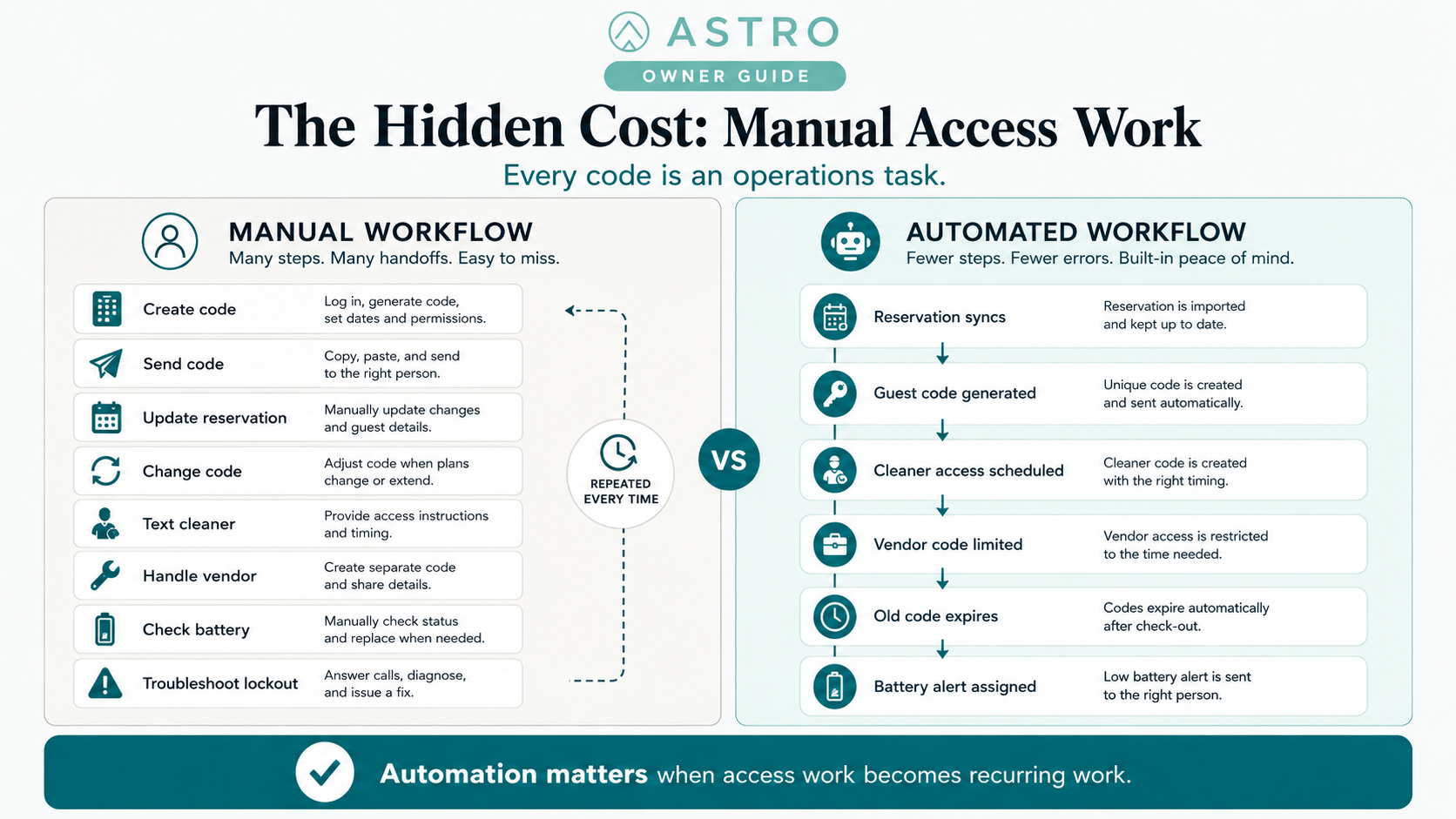
The owner’s hidden cost: manual access work
Manual access work is easy to underestimate. Every code change, guest message, cleaner coordination, vendor request, battery check, and lockout response consumes attention. For one property that may be manageable; for five it becomes a system; for twenty it becomes an operations function. Price the system against the work it replaces—not only hardware cost.
The dangerous middle
The worst setup looks automated but still depends on you remembering things: scheduled codes you must create manually; Airbnb automation without Vrbo or direct bookings; guest codes that expire but cleaner codes never do; battery alerts with no one assigned to replace batteries; audit logs nobody reads; PMS “integration” that only partially syncs reservation changes. Partial automation is fine. Unclear partial automation is not. Know exactly where automation ends and manual work begins.
OTA-native automation vs platform-agnostic access
Some booking platforms support smart-lock connections that generate unique stay-window codes, auto-deactivate at checkout, and surface check-in notifications or low-battery alerts for compatible locks in supported markets. That is useful—but access should not depend on one channel alone.
Most serious owners eventually handle Airbnb, Vrbo, Booking.com, direct bookings, repeat guests, cleaner and vendor access, owner blocks, maintenance, ASTRO member stays, and emergency access. If automation only works for one channel, you still need a broader plan—especially if you are building independence from any single OTA.
What to ask vendors
When evaluating any lock, platform, PMS integration, or access system, ask specifically: which exact locks and booking sources are supported; whether guest codes are unique, time-limited, and automatic; whether codes are sent automatically; whether cleaners and vendors get appropriate access; whether you can revoke instantly; what happens when Wi-Fi or battery fails; whether mechanical backup exists; whether logs and battery alerts are available; whether multiple properties and doors are supported; and who supports the system when something breaks at midnight. Vague answers usually mean limits you will discover later.
What not to overbuy
Do not overbuy if the property is simple, you are local, cleaner access is easy, volume is low, direct bookings are not active, and one reliable keypad lock with a strong backup plan solves the problem. The goal is not the fanciest system—it is the right system for the real operating load.
What not to underbuy
Do not underbuy if you are remote, guests arrive late, cleaner access is frequent, you use multiple channels, the property has shared gates or amenities, you cannot respond quickly to lockouts, you are adding direct bookings or properties, or access failure would create refund, review, or safety problems. A weak access system can cost more than a strong one.
Before you buy
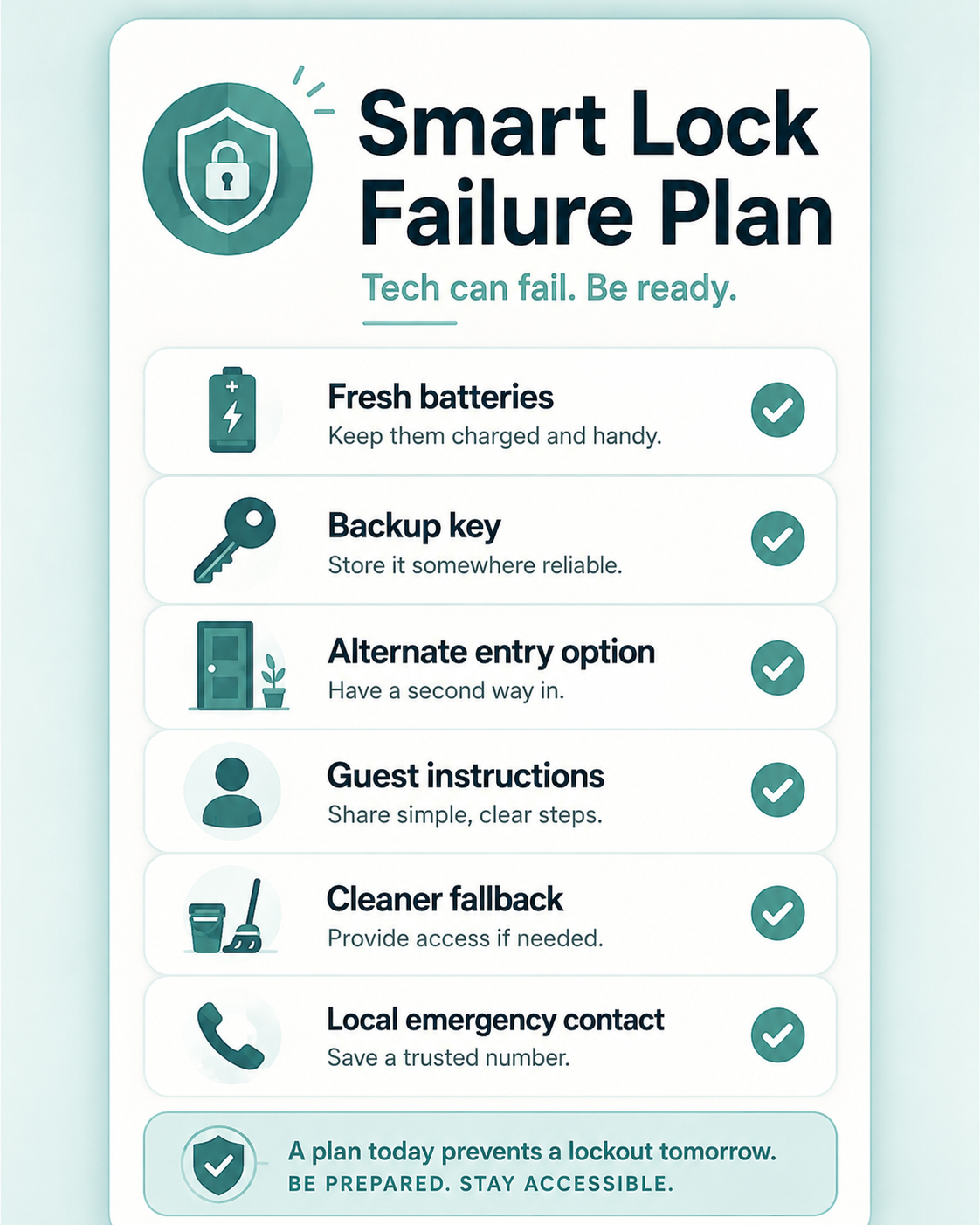
Before choosing a lock or access platform, answer: How many doors must the guest pass through? Who needs access besides guests? How many booking sources do you use? Do you need automatic, cleaner, and vendor codes? Are you managing this remotely? What happens when Wi-Fi or the battery fails? Can you support this at midnight? Will it still work if you add direct bookings or another property?
If those answers are simple, buy simple. If they are complex, do not pretend a keypad alone will solve them.
Why this matters for ASTRO owners
The right access system supports your actual property, team, and booking model—not your aspiration to look “smart.”
For some owners, that is a high-quality consumer smart lock with scheduled codes and a backup key. For others, it is a rental access platform tied to reservations, cleaners, vendors, and direct-booking workflows. For shared buildings, it may be a commercial or building-approved plan covering more than the unit door.
ASTRO does not sell locks or access software. But guest-facing operations—check-in instructions, house guides, and tools such as Guest Portal—assume access works the way you describe it. A smart lock is hardware. Access control is an operating system. Map the stack first, then buy the operating system you actually need.
The right system makes arrivals smooth, turnovers easier, vendors accountable, and emergencies less chaotic. The wrong system is a keypad attached to a bigger problem. When you are ready to align property identity with how you operate, explore the registry or join ASTRO.
Common mistakes owners make
- Choosing a lock brand before defining guest, cleaner, vendor, and emergency workflows.
- Expecting a consumer lock app to behave like STR operations software.
- Automating Airbnb codes while direct bookings and Vrbo stays stay manual.
- Installing a unit smart lock in a shared building without solving the arrival path.
- Treating PMS “integration” as full automation without verifying channel and change sync.
- Overbuying enterprise access control for a single simple property.
The Simplest Counterargument
Many owners do not need a platform. A solid keypad lock, a backup key, and a co-host who can respond locally may handle years of stays without subscription fees or integration debugging. Why add software layers when the door is simple and the owner is nearby?
That objection is fair. Category choice should follow operating load, not industry fashion.
What Still Matters
Even a simple setup must answer operational questions: who gets in, when codes change, what happens when the battery dies, and how cleaners enter without sharing guest codes.
The goal is not the most connected lock. The goal is the access category that matches how the property is booked and operated—and that fails gracefully when something goes wrong.